SDi toolsBox
Welcome
Welcome to the official SDi toolsBox documentation. Here you will find a detailed view of all the classes, functions and external tools.
Installation
Installing the toolbox is done by copying the build toolBox directory to the project repository, ideally to the solution directory:
|-- project_directory/
| |-- sdi_toolBox_x.x.x/
| |-- src/
| | |-- project.vcxproj
| | |-- ...
| |-- project_solution.sln
Next, save this path in the development project settings. Example with Visual Studio:
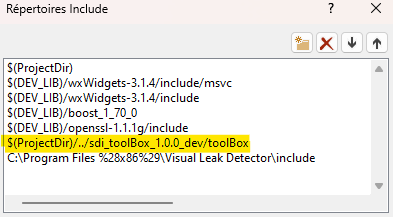
Finally, to use the available tools, it will be necessary to include the header files in this way:
#include <sdi_toolsBox/xxxxx.h>
#include <sdi_toolsBox_legacy/xxxxx.h>
#include <sdi_toolsBox_experimental/xxxxx.h>
License
The zlib License

Copyright (c) 2026 SD-Innovation S.A.S.

This software is provided ‘as-is’, without any express or implied
warranty. In no event will the authors be held liable for any damages
arising from the use of this software.

Permission is granted to anyone to use this software for any purpose,
including commercial applications, and to alter it and redistribute it
freely, subject to the following restrictions:

1. The origin of this software must not be misrepresented; you must not
claim that you wrote the original software. If you use this software
in a product, an acknowledgment in the product documentation would be
appreciated but is not required.

2. Altered source versions must be plainly marked as such, and must not be
misrepresented as being the original software.

3. This notice may not be removed or altered from any source
distribution.